

Managing your micro-websites
This page is dedicated to the full administration of your micro-websites, helping you manage their content, design, publishing, and archiving.
Understanding micro-websites
Section titled “Understanding micro-websites”Should I create a product micro-website or a brand micro-website?
Section titled “Should I create a product micro-website or a brand micro-website?”To maximize engagement, we recommend favoring one micro-website per product when your QR code is placed on packaging. Highly targeted and contextualized content usually performs better than a generic brand micro-website.
That said, to get started, you can absolutely create a global brand micro-website and connect it to several products.
For QR codes used on other media such as advertising or social media, make sure the micro-website content is directly aligned with the message on that medium and with the context in which the code is scanned.
How do I choose a starter template?
Section titled “How do I choose a starter template?”When you create a micro-website, QRanberi lets you start from a blank page or select a template, whether basic or thematic. QRanberi offers a full gallery of templates adapted to different use cases.
- For a quick start: We recommend beginning with a “product” template such as “Maison Legumine” or a basic template. They are designed to be easy to customize.
- For a specific marketing goal: Explore our gallery of thematic templates such as recipes, giveaways, or brand presentations to choose the one that best matches your needs.
Can search engines index my micro-websites?
Section titled “Can search engines index my micro-websites?”No, your micro-websites are not indexed by search engines. They are only accessible through the short link embedded in your QR code or if you share that link directly in a publication.
As a result, you do not need to optimize your content with SEO keywords. You can focus fully on creating attractive, engaging content for your consumers.
Why is the image of my micro-website not up to date on the page?
Section titled “Why is the image of my micro-website not up to date on the page?”If the preview image of your micro-website is not up to date in the manager, it is probably because you have not published your latest changes yet.
Don’t worry, your work is safely saved. To update the preview and make your changes visible, simply publish your micro-website. Open the micro-website editor and click the “Publish” icon in the top-right corner.

Creation and content
Section titled “Creation and content”How do I create a micro-website?
Section titled “How do I create a micro-website?”To create a micro-website, click the "Create a micro-website" button in your back office. Select a starting template, whether basic or thematic, or start from a blank page.
Enter the name of your micro-website. You will then enter the micro-website editor, which is where you can start building.
Add your design and content. Save, then publish. You can preview it right away or view it using the QR code.
To make your micro-website visible to consumers, connect it to a QR code from the QR code manager or use the micro-website URL available in the "Micro-websites" area next to its image.
Can I edit my micro-website?
Section titled “Can I edit my micro-website?”Yes, you can edit your micro-website at any time and as often as needed. Our editor makes it easy to evolve every part of it: sections, pages, features, themes, and text.
After each update, you simply need to publish your micro-website for the changes to become visible to consumers right away. We also encourage you to review your micro-website performance regularly using your page statistics so you can refine your engagement strategy over time.
Can I adapt the micro-website to match my design?
Section titled “Can I adapt the micro-website to match my design?”Absolutely. QRanberi is designed to let you easily integrate your brand identity into your micro-website, allowing for a high level of customization.
In the micro-website editor, you will find the “Global style” section, represented by a gear icon in the left-hand menu. This is where you can define and adapt the overall look to match your design.
In addition, when you select a specific "Section", you can customize its background color using the “Decorations” option in the right-hand menu.
Explore everything QRanberi has to offer to create a unique micro-website that aligns perfectly with your brand image.
What kind of content should I highlight on my micro-website?
Section titled “What kind of content should I highlight on my micro-website?”We recommend focusing on content that creates impact, drives differentiation, and boosts consumer engagement. The goal is to showcase the essence of your brand and respond precisely to user expectations based on the context in which the QR code is scanned.
To do that, you can:
- Highlight the unique benefits of your products or your brand.
- Share transparent information such as origin, manufacturing, or certifications.
- Offer interactive content such as recipes, tutorials, contests, or surveys.
- Adapt the message to the medium, whether packaging, posters, or online advertising.
Do not hesitate to use our existing templates as a starting point, then adapt them with your own content and brand design.
Can I use videos?
Section titled “Can I use videos?”Yes, absolutely. QRanberi lets you easily embed videos on every page of your micro-website.
Videos are added in embedded format from platforms such as YouTube. Video is a powerful engagement driver and is ideal for:
- Presenting customer testimonials.
- Expanding on a claim or aspect of your product.
- Sharing tutorials or usage tips.
- Telling your brand story in a compelling way.
In the micro-website editor, when you choose to add a component using the "+" command, select video and then enter the video’s ID.
Can I upload files with product information to make it easier to create my micro-websites?
Section titled “Can I upload files with product information to make it easier to create my micro-websites?”Yes. To simplify the creation of multiple product micro-websites, QRanberi offers the ability to integrate data in bulk.
If you have a large volume of product information to integrate, our team can help you with that process. To learn more about our data integration solutions, feel free to contact us.
Can I create a micro-website template?
Section titled “Can I create a micro-website template?”Yes, QRanberi gives you several ways to create and reuse templates to save time:
- Create a full template micro-website: You can design a first micro-website in the editor and then duplicate it. To do that, go to the
"Micro-websites"area and use the “Copy” icon on the right side of the micro-website you want to duplicate.

- Save custom content blocks: In the micro-website editor, when you select a single element or a block made up of multiple elements, a save icon will be offered. This lets you save that block as a reusable component. You will then find it in the
"My components"section when adding new elements to other micro-websites.
See: How do I use my custom components or saved blocks?
How do I publish my micro-website?
Section titled “How do I publish my micro-website?”To make your micro-website accessible and visible, you simply need to publish it.
In the micro-website editor, look for the “Publish” button, usually located in the top-right corner of the interface, and click it.
Once published, your micro-website is online and immediately accessible through its direct link and any QR code associated with it. Your consumers can then view it by scanning the corresponding QR code.
Management and organization
Section titled “Management and organization”Can I rename my micro-website?
Section titled “Can I rename my micro-website?”Yes, you can rename your micro-website at any time. In the “Micro-websites” area, simply click directly on the micro-website name next to its preview image to edit it. Confirm the change for it to be saved.
How can I find a micro-website easily?
Section titled “How can I find a micro-website easily?”All your micro-websites are listed in the “Micro-websites” area.
To find them easily, you have several options:
- Sort them by name in alphabetical order or by creation or modification date.
- Use the search bar at the top-left of the screen to filter by keywords present in the name of your micro-websites.
Can I archive my micro-websites?
Section titled “Can I archive my micro-websites?”Your micro-websites are automatically kept and remain accessible in your “Micro-websites” area throughout your subscription period.
Can I connect my micro-website to an existing QR code created with another solution than QRanberi?
Section titled “Can I connect my micro-website to an existing QR code created with another solution than QRanberi?”Yes, absolutely. You can connect your QRanberi micro-website to a QR code created on another platform, as long as that external QR code is dynamic and lets you edit its redirect URL.
Here is how:
- Get your QRanberi micro-website URL: In the
"Micro-websites"area, you will find the URL of your creation next to its preview image. - Paste that URL: In the editor of your current QR code platform, simply paste your QRanberi micro-website URL into the redirect field of your existing QR code.
Can I point a GS1 QR code created on codeonline to a QRanberi micro-website?
Section titled “Can I point a GS1 QR code created on codeonline to a QRanberi micro-website?”Yes, absolutely. You can easily point a GS1 QR code created on the codeonline platform to your QRanberi micro-website.
Here are the steps:
- Get your QRanberi micro-website URL: In the
"Micro-websites"area, copy the micro-website URL displayed next to its name and preview image.
- Configure your QR code in codeonline: When creating or editing your QR code in codeonline, paste that QRanberi micro-website URL into the field labeled “Destination URL.”
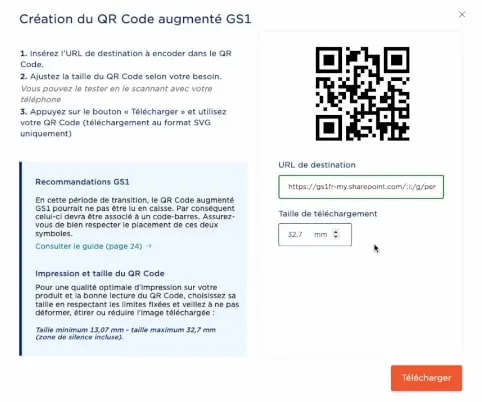
https://www.gs1.fr/codeonline-plateforme-ligne-creer-gerer-vos-codes-gtin-gln
Publishing and hosting
Section titled “Publishing and hosting”Where is my micro-website stored?
Section titled “Where is my micro-website stored?”Your micro-websites are hosted on AWS (Amazon Web Services) in France, ensuring security and full compliance with European regulations, especially GDPR. We use a modern Jamstack architecture to deliver your content quickly and reliably.
Who can see my micro-websites?
Section titled “Who can see my micro-websites?”Your micro-websites can be accessed in two main ways:
- By scanning the QR code that is directly connected to your micro-website.
- Through the short link that leads to your micro-website, for example
https://ma-marque.qrtrust.link, which you can share freely on any publication or digital medium.
Which domain name can I use?
Section titled “Which domain name can I use?”Each customer micro-website is hosted on its own dedicated subdomain, for example https://ma-marque.qranberi.site.
For advanced customization, you can also configure a fully custom subdomain for your micro-websites, for example https://qr.ma-marque.com. To learn more, contact us.
Which short link is used on the QR code?
Section titled “Which short link is used on the QR code?”For QR code redirects, we use dedicated subdomains, for example https://ma-marque.qrtrust.link. This ensures fast and reliable redirection.
As mentioned above, you also have the flexibility to configure a custom subdomain for your redirect links if needed, for example https://qr.ma-marque.com/.
Performance and reliability
Section titled “Performance and reliability”How much traffic can my sites handle?
Section titled “How much traffic can my sites handle?”Thanks to our robust infrastructure based on advanced AWS cloud services and a global CDN, your micro-websites benefit from instant scalability. That means our platform is designed to handle large traffic volumes and automatically adapt to your needs while maintaining strong performance.
Is my data protected?
Section titled “Is my data protected?”Yes, protecting your data is a priority. We secure sensitive data using encryption and strict access management. We also rely on regular automatic backups and database redundancy to protect your information and ensure it remains available at all times. Full compliance with European regulations, including GDPR, is part of our approach.
What service availability does QRanberi guarantee?
Section titled “What service availability does QRanberi guarantee?”QRanberi relies on a robust infrastructure with a 99.9% service continuity guarantee. This high availability is supported by advanced cloud services and an optimized architecture, including Jamstack and a global CDN for micro-websites.
We also provide 24/7 monitoring with real-time alerts so issues can be anticipated and resolved quickly. Proactive maintenance helps ensure the platform stays stable and reliable over time.
What happens if a micro-website goes down?
Section titled “What happens if a micro-website goes down?”We have put a proactive monitoring system in place to ensure your micro-websites stay available. If a failure occurs or if the link between a QR code and its micro-website is broken, our daily detection system automatically sends an email notification to your administrator inbox.
You can then quickly verify the link, fix it if needed, or choose a new destination for your QR code to minimize any service interruption.